Unit 1 · pressurized-water reactor · hot standby
Run a nuclear reactor
control room.
Take the reactor critical, roll the turbine to 3,600 rpm, close the breaker and pick up load. Then keep it there — through a stuck-open relief valve, a xenon transient, or a trip at full power. A realistic reactor simulator that runs free in your browser.
New here? Pick the guided startup when it opens: eleven short steps from a hot plant to the grid.
📱 Plays on phones too, with its own phone layout. Roomiest on a desktop, laptop, or tablet.
Fission Control is still growing, and you're playing an early version. If you spot a bug, something that doesn't behave the way a real plant would, or an idea that would make it better, I'd genuinely love to hear it — send a quick note. Every report helps shape what comes next.
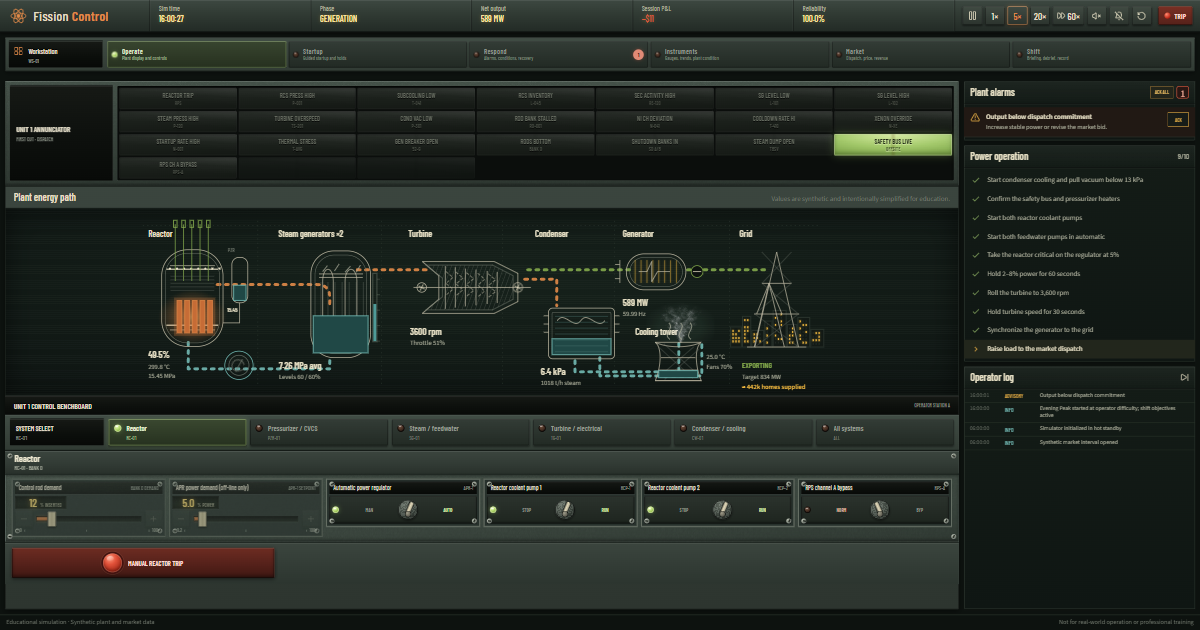
What you'll be running
A whole pressurized-water reactor plant, modelled the way the real thing behaves — and explained as you go.
Real reactor physics
Delayed neutrons set the pace, Doppler and moderator feedback hold the power, and the reactor follows the turbine the way a real PWR does. Pull rods too fast and short period trips you.
Steam, turbine & grid
Steam pressure comes from saturation temperature, steam dumps hold a hot plant at no load, and megawatts come from the steam actually passing through the turbine.
Guided startup
An eleven-step instructor takes you from a hot plant to the grid. It highlights the one control you need, ticks tasks off as the plant responds, and fast-forwards the waits.
Trips & recovery
A trip is where the work starts. Stabilize on the steam dumps, borate, cool down at under 55 °C an hour, depressurize, and get residual heat removal in service.
Xenon & faults
Real iodine and xenon half-lives make a restart window you can miss. Eleven malfunctions — from a stuck-open PORV to a tube rupture — each show their real signature.
Shifts & the Daily
Scored shifts against a live electricity market, plus a Daily Shift: the same plant and faults for every operator that day, with a result card to share.
Your first shift
Hot standby to the grid — here's the path the guided startup walks you through.
Line up the plant
Pull a vacuum on the condenser, start both reactor coolant pumps, and put feedwater in automatic.
Take it critical
Let the regulator withdraw the rods until power levels off near 5%, then hold it steady for a minute.
Roll & synchronize
Open the main steam valve, spin the turbine up to 3,600 rpm, and close the generator breaker.
Pick up load
Offer into the market and raise the governor. The reactor follows the turbine — keep it inside its limits.
Frequently asked questions
The quick answers.
Is Fission Control free to play?
Yes — completely free in your browser, with nothing to buy and no account to create. If you enjoy it, you can optionally support development on Ko-fi.
Do I need to download or install anything?
No. It runs entirely in your browser. Click Play and you're in the control room. On a phone you can also add it to your home screen to open it like an app.
Can I play on a phone or tablet?
Yes. On a phone the control room switches to a phone layout — one control per row, a bottom tab bar for the workstations, and a tutorial coach that tucks out of the way. A desktop, laptop, or tablet gives the full console room to spread out.
How realistic is the reactor?
The plant behaves like a real pressurized-water reactor: six-group point kinetics with delayed neutrons, Doppler and moderator temperature feedback, real iodine and xenon half-lives, the standard decay-heat curve, steam generator pressure from saturation temperature, automatic steam dumps, and realistic reactor protection. It's simplified for play and learning — it is not a tool for training on or operating real plants.
I've never run a reactor. Where do I start?
Choose the guided startup when the game opens. It takes you through eleven short steps from a hot plant to the grid: it tells you what to press, highlights the control, ticks each task off as the plant responds, and fast-forwards the waits.
Is Fission Control finished?
Not yet — it's actively in development, and new features and fixes land regularly (see the devlog). That also means you may run into the odd rough edge. If you do, or if you have an idea for something that would make it better, please get in touch. Bug reports and suggestions are always welcome and genuinely appreciated.
Who made it, and how can I support it?
It's built and run solo by an independent developer — the same one behind Hydroelectric Sim. Hosting and the domain cost real money; if you'd like to help keep it online and growing, see the Support section below.
Support an indie developer
Hi, and thanks for checking out Fission Control — it means a lot that you're here.
I'm an independent developer. After building a hydroelectric dam control room, I wanted the same thing for a nuclear plant: a reactor you could actually sit down and run, that behaves the way the real one does. So I built it.
I work on this in my spare time and run it solo. Keeping it online costs real money — the domain, the hosting, and the hours that go into improving it. If you've enjoyed it, any support goes straight toward those costs and new features. Even a small tip helps more than you'd think. 🙏
Get in touch
Found a bug, or have an idea that would make Fission Control better? Since the game is still in development, your feedback makes a real difference — nothing is too small to mention. Questions and licensing enquiries are welcome too.
Prefer your own email app? Write to [email protected]
Terms, copyright & privacy
The important bits, in plain language.
By accessing or playing Fission Control (the game and this website, "the Game") you agree to these Terms of Use. If you do not agree, do not use the Game.
① Copyright & ownership
- © 2026 Fission Control. All rights reserved.
- Fission Control and all of its content — including its source code, compiled output, game design, text, graphics, audio, and simulation models — are owned by Fission Control and protected by copyright and other intellectual-property laws.
② Licence to play
- You are granted a personal, non-exclusive, non-transferable, revocable licence to access and play the Game for your own personal, non-commercial entertainment and learning.
- This licence grants no ownership and may be revoked at any time.
③ Things you may not do
- Copy, reproduce, modify, publish, distribute, sell, rent, sublicense or create derivative works from any part of the Game or its code or assets;
- Reverse-engineer, decompile, disassemble, or otherwise attempt to extract the source code, simulation models, or assets;
- Remove or alter any copyright, trademark, or proprietary notice;
- Use bots, scrapers, or automated means to access or harvest the Game, or use it to build a competing product.
④ Privacy
- Fission Control runs entirely in your browser. There are no user accounts, and your game progress is not sent to or stored on our servers. Your plant, career record and daily results are kept in your own browser's local storage, and clearing your browser data erases them.
- We use Google Analytics to understand how the site and game are used so we can improve them. It sets cookies and collects standard usage data — such as pages viewed, device and browser type, approximate (city-level) location, and a randomly-generated identifier — which Google processes on our behalf. We look at this only in aggregate and do not use it to identify you personally.
- You can opt out at any time through your browser's cookie controls or Google's Analytics opt-out add-on. See Google's Privacy Policy for how it handles this data.
- The site does not currently show advertising. If that changes, this section will be updated first.
- If you use the contact form, your name, email and message are delivered to us by Web3Forms so we can reply. We use them only to answer you.
- Our hosting provider may also process standard technical information (such as IP addresses in routine server logs) solely to deliver and secure the website.
⑤ No warranty — and not for real reactors
- The Game is provided "as is" and "as available", without warranties of any kind, express or implied, including fitness for a particular purpose.
- All plant and market values are synthetic. The Game is an educational simulation, simplified for play. It is not a tool for operating, training on, licensing for, or modelling any real nuclear plant or equipment. You use it at your own risk.
⑥ Limitation of liability
- To the fullest extent permitted by law, Fission Control shall not be liable for any indirect, incidental, or consequential damages arising from your use of (or inability to use) the Game.
⑦ Changes & governing law
- These Terms may be updated from time to time; continued use of the Game means you accept the current version.
- These Terms are governed by the laws of the United States, without regard to conflict-of-law rules.
⑧ Contact
- Licensing enquiries and copyright / takedown notices: [email protected]
This summary is provided for transparency and is not legal advice. Last updated 2026.